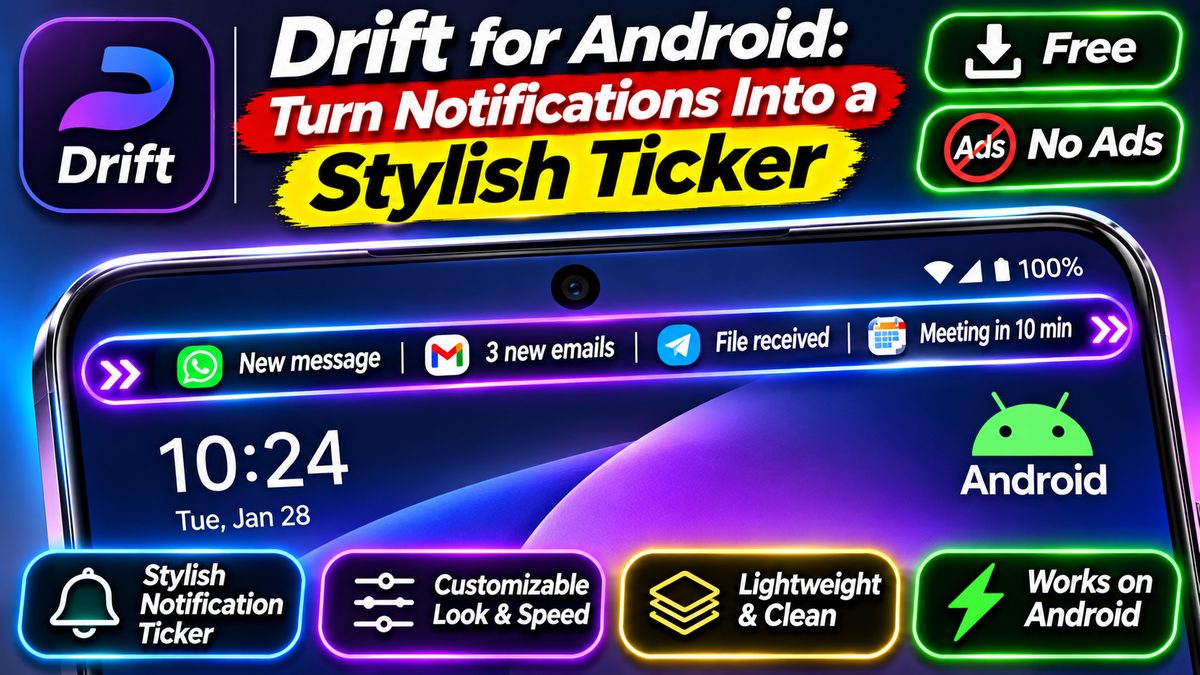
Drift for Android: Turn Notifications Into a Stylish Ticker (Free, No Ads)
What Is Drift?
Picture this: you are mid-game, or halfway through a video, and a notification drops in — a big banner that covers the top of your screen, sits there, and refuses to leave until you deal with it. Drift: Notification Ticker is a free Android app by Light Source Labs that replaces those intrusive pop-ups with a smooth scrolling ticker. When a message or alert arrives, it glides across a slim strip on your screen instead of covering it, so nothing interrupts your game, video, or reading.
The idea is a throwback with a modern coat of paint. Old Android phones had a scrolling ticker for notifications, and plenty of users missed it when heads-up banners took over. Drift brings it back — cleaner, faster, and far more customizable than the original ever was. It launched on the Play Store in October 2026, and by early November it was already climbing the Top New Free productivity charts in several countries, with a 4.5-star rating from its first users.
Here is the key point, straight from the developer: Drift only changes how notifications are displayed. Your notifications still work normally, the notification shade is untouched, and you can turn the ticker off for any app you like. Nothing is blocked, nothing is hidden — it just looks better.
Why the Ticker Beats Pop-Ups
Heads-up notifications were designed to make sure you never miss anything. The problem is they do their job too well: a banner drops in, covers what you were doing, and demands attention right now. If you are gaming, that banner can cost you a match. If you are watching a video, it covers the subtitles. If you are reading, it breaks your place. Drift’s ticker solves the same problem a different way — it shows you what arrived without taking over the screen.
The ticker scrolls the message across, then gets out of the way. You still see who messaged and what they said, just without the interruption. Notifications queue up instead of stacking on top of each other, so a busy minute turns into a calm scrolling line rather than a pile of banners. It is a small change to your phone that changes how the phone feels all day — calmer, less pushy, more under your control.
That matters more than it sounds. We check our phones hundreds of times a day, and every pop-up is a tiny hijack of our attention. A ticker respects the thing you were already doing. It is the difference between someone tapping your shoulder and someone shouting in your ear.
Make It Yours: Customization
Drift’s biggest strength is how much you can shape it. The app offers more than 90 notification styles, animations, and effects, so the ticker can look however you want — subtle and quiet, or bold and impossible to miss. You control the position, the speed, and the look, and you can pick which apps are allowed to show up in the ticker at all.
Per-app control is the feature that makes it practical. Let WhatsApp and Gmail scroll through, keep the shopping apps and games out, and the ticker only carries what you actually care about. Quiet Hours pauses the ticker automatically when you want it — late at night, say — so your screen stays calm while you sleep. And if you reply to messages a lot, users report that Drift offers quick reply options, so you can answer without opening the app.
There is a paid Pro version too, and this is worth saying plainly: the free version is fully usable, while Pro adds extra customization features. We could not verify the Pro price from the Play Store listing at the time of writing, so we will not quote one here. The free tier is the real story — no ads, no subscription needed to get the ticker working.
Lightweight and Private
Drift is a small app. The download is about 21 MB, it runs on Android 8.0 and above, and it is built around a lightweight notification pipeline with hardware-accelerated rendering, so the scrolling stays fluid without chewing through battery or memory. On a phone full of heavy apps, a 21 MB utility that does one job well is a welcome change.
Privacy is handled the right way, too. Drift processes your notifications locally, on your device. Nothing is uploaded to a server or used for advertising — the Play Store description says so directly, and there are no ads in the app at all. Your messages stay between you and your phone, which is how it should be for an app that reads your notifications.
That on-device approach is also why the app feels quick. There is no round trip to a server, no account to sign into, no sync to wait for. Install it, grant the permissions it asks for, and it starts working.
How to Install and Set Up Drift
Getting started takes a few minutes:
- Install Drift from the Play Store — it is free, with no ads.
- Open the app and grant the permissions it needs. A ticker app needs notification access to read incoming alerts, and overlay permission to draw the scrolling strip on top of other apps. Both are normal for this kind of app, and Drift explains what each one is for.
- Pick a ticker style you like. Start with the default and change the position, speed, and look until it feels right.
- Choose which apps can appear in the ticker. Start with messaging apps, then add more as you get used to it.
- Set Quiet Hours for the times you want the ticker to pause, and you are done.
One honest note: a small number of early users report that setup can be fiddly on some phones — one reviewer found the stock pop-up still appearing even after setting everything up. If that happens, double-check that notification access is actually granted and that your phone’s battery optimization is not killing Drift in the background. It is a young app, and rough edges like that are part of the deal with a tool that launched only weeks ago.
Should You Try Drift?
If pop-up banners drive you mad, yes. Drift is free, ad-free, light, and private, and it fixes a daily annoyance in a way that feels like Android should have done it years ago. Gamers, video watchers, and heavy readers will feel the difference first, but anyone who gets a lot of notifications will notice the calmer screen within a day.
If you like reshaping how your phone looks and behaves, Drift pairs well with a custom launcher — see Nova Launcher for Android and Microsoft Launcher for Android for two of the best. Between a launcher you control and a ticker you control, your phone starts to feel like yours again, not like a billboard that happens to make calls.
The only reason to hold off is if you depend on heads-up banners for urgent alerts — some people genuinely prefer a big pop-up for work messages. For everyone else, Drift is a small, free download that makes your phone noticeably calmer. That is a good trade.
Download: Drift for Android (official Google Play listing) — free, no ads, Android 8.0+. Listing details: Drift on AppBrain. Hands-on overview: Pushpendra Tech.